


Security Camera CZ
4.31.18K Reviews
App Specs
- Version
- 3.14.3
- Updated On
- License
- Free
- Downloads
- 1,000,000+
- Developer
- SCamera
- Categories
- House & Home
- Platform
- Android
Screenshots
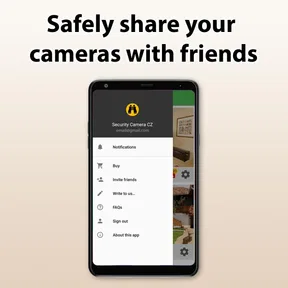
 Analysis by AppCompare
I’d treat Security Camera CZ as a practical way to put a spare phone to work, rather than as a complete replacement for a dedicated security system. That distinction matters: a phone-based camera can be useful for checking a room or keeping an eye on a pet, but it depends on two devices, a dependable connection and a sensible place to leave the old one. If that sounds manageable, it can be a worthwhile House & Home app to try.
Where people can get stuck
The idea is simple, but the first hurdle is having a suitable spare device and a clear plan for where it will sit. The camera phone needs to stay powered and positioned so it can see the area you care about; the phone you carry is the one you use to check in. If either device is switched off, moved or disconnected, the arrangement may not work as you expect. I’d test the whole setup while at home before relying on it when you go out.
Placement is less trivial than it sounds. A wide view of a room may make movement easy to notice but leave small details hard to see, while aiming too close at a doorway can miss activity elsewhere. Before settling on a spot, I’d check the view from the receiving phone and adjust the camera’s angle. A stable surface is also better than balancing an old phone somewhere it could slip or be knocked down.
There is a trade-off in using a phone rather than a purpose-built camera. You reuse hardware you already own, but you also need to think about its battery, charging cable, heat and physical security. A phone that is already unreliable may not be a dependable camera just because it can run the app. For an occasional check on a room, that compromise can make sense; for continuous, high-stakes monitoring, I’d compare dedicated equipment before deciding.
Checks that make setup smoother
The app is free to download, with in-app purchases listed at $14.99 per item, so I’d try the basic arrangement before spending anything. Its current version is 3.11.0, and it is made by SCamera. I would begin with both devices updated and connected to the network I intend to use, then confirm that the camera phone remains online after the screen is left alone. This simple check can reveal a device or connection issue before it becomes a frustrating surprise.
Give the camera phone a deliberate home: near a suitable power source, with the lens unobstructed and the device unlikely to be disturbed. Keep the charging lead routed so it cannot pull the phone out of position. If you are monitoring a pet, make sure the camera is stable and out of reach; curious animals can turn a carefully framed view into a shot of the floor.
It is also worth checking the view in ordinary room lighting and after dark before you leave the setup unattended. A camera angle that looks fine in daylight can become less useful when the room is dim or a lamp creates glare. I’d walk through the space, check what the camera can actually see, and decide whether motion alerts would be useful or likely to fire repeatedly because of normal activity.
Worth Reading Before You Choose

Flipboard Shows What News Apps Must Do Beyond the Feed

Switching to Android Auto Means Rethinking Your Driving Routine

Google Calendar Makes a Crowded Week Easier to Manage

Ludo King Makes the Most of the Minutes Between Plans

Baby Panda World Brings Quick Play to Modern Phones, but Its Game Library Feels Busy

ESPN’s Live Game View Makes Following Close Games Easier
Making the setup useful day to day
A realistic use is checking on a dog in the living room while you run a nearby errand. I’d place the spare phone where it shows the dog’s usual resting area, test the feed from the phone I carry, and then check in briefly rather than treating the stream as a substitute for being home. That small rehearsal helps answer practical questions: can I see the area clearly, does the old phone stay connected, and do alerts tell me something useful?
Recovering when the workflow breaks
If the feed is unavailable, I would work through the simple causes first instead of immediately reinstalling the app. Check that the camera phone has power, that the app is still open and that the device has a network connection. Then check the receiving phone’s connection too. Testing both ends while they are in the same place can help separate a setup problem from a remote-access problem.
If alerts seem absent or excessive, look at the camera’s position and the activity in its view before changing several things at once. A moving curtain, passing people or a pet crossing the frame may create notifications that are technically expected but not helpful. Narrowing the view to the area that matters can make alerts easier to interpret. If the picture is poor, first check for smudges, obstructions, glare and a weak connection; those everyday issues can be more likely than a fault in the app.
When a different option makes more sense
This app is best suited to people who already have an unused phone and want a flexible way to check a room, a pet or a familiar indoor space. It is less appealing if you need a camera designed to stay in place for long periods, need dependable monitoring of several areas, or cannot leave a phone plugged in and positioned safely. A dedicated camera may be a better fit when the hardware itself needs to be purpose-built for a fixed location; a simple in-person check is better when you only need occasional reassurance and do not want another device running.
Privacy deserves practical attention, too. I would point the lens only at the area I mean to monitor, avoid capturing private spaces unnecessarily, and make sure other household members know when the camera is in use. The original article describes password protection and secure connections, but I would still use a strong, unique password and keep access limited to people who genuinely need it. A phone camera is convenient, not a reason to stop thinking about who can see the feed.
Who is likely to appreciate it
The appeal is clearest for someone with an older phone that still works reliably, a modest monitoring need and a place to leave the device safely. It can make sense for checking whether a pet has settled, keeping an eye on a room while away, or temporarily observing an area during a routine change at home. The app has an Everyone content rating, and its broad audience is reflected in an average rating of 4.3 from around 17,000 ratings, with over one million installs. Those figures suggest it has attracted a substantial audience, though they do not guarantee it will suit every network or device.
If you do not have a spare phone, do not want to keep one plugged in, or need monitoring you can depend on without checking the setup, I would skip this approach and look at equipment built for that job. I would also avoid treating a phone camera as an emergency or professional security system. It is a convenient extra set of eyes, not a substitute for a plan that needs guaranteed coverage.
As an app in the House & Home category, it sits between doing nothing with an old handset and buying a dedicated camera. The first option costs no setup effort but gives you no remote view; the second may be more suitable for permanent monitoring, while this one makes reuse its main advantage. It was released on April 25, 2018, and the current version is 3.11.0, so I’d still check that it behaves well on the particular devices I plan to use rather than assume every older handset will perform alike.
Easy Setup and User Interface
First off, the setup is a breeze. You don’t need to be a tech wizard to get things rolling. After downloading the app, you’ll find that the interface is super intuitive. I was up and running in just a few minutes. The app guides you through connecting your devices with clear instructions. It felt like the app was holding my hand through the process, which was a relief.
Features That Stand Out
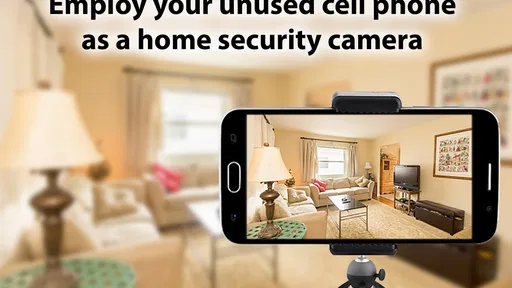
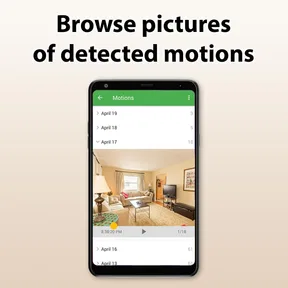
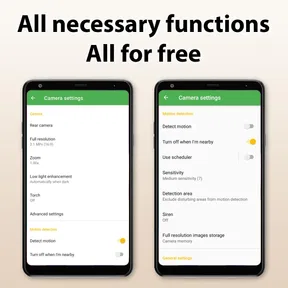
Once set up, the features are where Security Camera CZ truly shines. You can turn any spare smartphone or tablet into a security camera. I had an old phone sitting in my drawer, and now it’s my new "security officer" keeping an eye on things. The app offers motion detection, which sends alerts directly to your current device. Trust me, getting an alert when someone (or something) moves into the frame is quite reassuring.
The night vision feature is another highlight. I tested it out in a dimly lit room, and the clarity was impressive. It's perfect if you want to monitor your home at night without having to leave lights on.
Connectivity and Accessibility
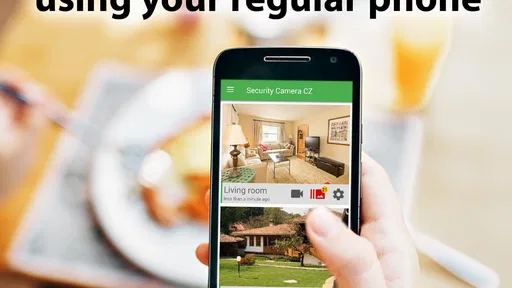
Being able to access the camera feed remotely is a game-changer. Whether you're at work or on vacation, you can tune into your camera feed anytime. I found it comforting to check on my living room during a weekend getaway. The app supports both Wi-Fi and mobile data, so you're covered even if your Wi-Fi acts up.
Plus, the app is available on both Android and iOS, which means you’re not limited by your device choice. I tested it on both platforms, and the experience was seamless across the board.
Performance and Reliability
Performance-wise, Security Camera CZ is rock solid. The video quality is crisp, and the app runs smoothly without draining your battery too quickly. I left it running for a couple of days, and I was impressed by how efficiently it managed power. The app didn’t crash or lag, which is a huge plus for reliability.
Privacy and Security
Now, let's talk about privacy. The app respects your privacy with secure connections and data encryption. I felt confident knowing my video feed wasn’t being compromised. In a world where data breaches are all too common, this is a breath of fresh air.
It’s important to ensure that your devices are secure too. The app supports password protection, so make sure to set that up to prevent unauthorized access.
Final Thoughts
In conclusion, Security Camera CZ is a must-have if you're looking for an easy and effective way to monitor your home. It packs a punch with its features, and the peace of mind it provides is priceless. Whether you’re tech-savvy or not, this app simplifies home security without cutting corners on functionality or performance.
If you’ve got a spare device lying around, why not give it a new lease on life as a security camera? Your home (and your nerves) will thank you.
Pros
- Easy to set up and use.
- High-quality video streaming.
- Motion detection alerts.
- Remote access from anywhere.
- Supports multiple cameras.
Cons
- Requires constant internet connection.
- Consumes significant battery life.
- Limited free features.
- Occasional app crashes.
- Ads in the free version.
FAQs for Security Camera CZ
What is Security Camera CZ and how does it work?
Security Camera CZ is a mobile application that transforms your smartphone into a surveillance camera, allowing you to monitor your home or office remotely. It works by utilizing your device’s camera to capture video footage and stream it to another device in real-time. You can access live feeds, receive motion alerts, and store recordings in the cloud or locally.
Is Security Camera CZ free to use, or are there any in-app purchases?
Security Camera CZ offers a free version with essential features, but it also includes in-app purchases for advanced options. These may include enhanced cloud storage, ad-free usage, and additional camera functionalities. Users can choose to upgrade to access these premium features, providing more flexibility and control over their surveillance needs.
How secure is the data captured by Security Camera CZ?
Security Camera CZ prioritizes user privacy and employs encryption protocols to ensure data security. Video streams and recordings are encrypted to prevent unauthorized access. The app also provides options to store data locally or on secure cloud servers, allowing users to choose their preferred level of data protection based on their security needs.
Can Security Camera CZ be used on multiple devices simultaneously?
Yes, Security Camera CZ supports multi-device connectivity. You can set up and monitor multiple cameras from a single account, allowing you to surveil different areas simultaneously. The app enables seamless switching between live feeds on different devices, making it convenient for users to manage multiple surveillance points efficiently.
What are the system requirements for using Security Camera CZ effectively?
Security Camera CZ is compatible with most Android and iOS devices, but it requires a stable internet connection for real-time streaming. Ensure your device has an updated operating system and sufficient storage for recordings. For optimal performance, a smartphone with a high-resolution camera and good battery life is recommended, especially for prolonged use.


